Betty Casino Login: How to Sign In and Fix Problems
On this page
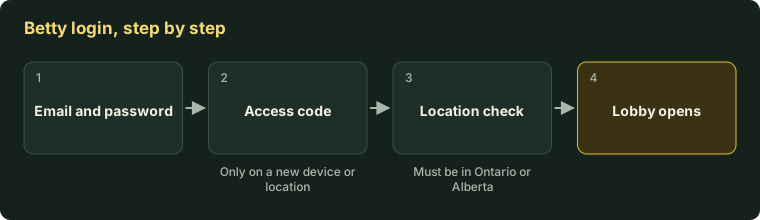
You log in to Betty with your email and password at betty.ca or in the official app. This website has no login form. On a new device, Betty emails you an access code.
Too many wrong passwords lock the account for 15 minutes, then it unlocks. Password reset links also last 15 minutes.
Check the address first. Search results for “Betty casino login” are full of look-alike sites. A real Betty login page is on betty.ca (Ontario, Alberta) or betty.com (other provinces). Never type your password anywhere else, including here.
| Where you play | Log in at | App name |
|---|---|---|
| Ontario | betty.ca | Betty Casino: Real Money Slots |
| Alberta | betty.ca | Betty Casino: Real Money Slots |
| Quebec, BC, Manitoba and other provinces | betty.com | Betty.com: Rest of Canada |
The two sites are separate services, and a login from one does not work on the other. See betty.com vs betty.ca for the difference. The rest of this page covers betty.ca.
How do you log in to Betty Casino?
Logging in takes five short steps on the web or in the app. You need the email and password from registration. Keep your phone or inbox nearby in case Betty sends a code.
- Open
betty.cain your browser, or open the official Betty app. - Select the log in option.
- Enter your email and password.
- If asked, type the access code from the email Betty sends.
- Allow location access when prompted.
The steps are the same on iPhone and Android. If you still need the app, see how to get the genuine Betty app. If you have no account yet, start with Betty sign-up and ID check.
Why is Betty asking for an access code?
Betty asks for an access code when you log in from a new device or a new location. This is an automatic security check, a form of two-factor authentication. That term means you prove who you are in two ways: your password, then a code sent to you.
You cannot switch this check off. It protects you if someone else learns your password. On a device you use often, you will rarely see it.
I didn’t get my Betty access code. What now?
A missing code is nearly always sitting in a spam or junk folder. Betty sends codes by email from [email protected]. Work through these steps in order:
- Wait two minutes, then refresh your inbox.
- Check spam, junk and promotions folders.
- Add
[email protected]to your safe senders or contacts. - Request a new code and use the newest email only.
- If nothing arrives, contact support by live chat.
Betty’s help centre has safe-sender steps for Gmail, Outlook, iCloud, Yahoo and others.
How do you reset a Betty password?
Select “Forgot Password” on the login screen and Betty emails you a reset link. Two rules trip people up:
- The link works for 15 minutes. After that, request a new one.
- The link works once. Clicking it twice makes it fail.
Your new password must be 8 to 20 characters long. If the page says the link has expired, you waited too long or opened it twice. Request a fresh link and open it once.
Why is my Betty account locked?
Too many failed login attempts lock the account for 15 minutes. This is temporary. Wait the 15 minutes, then try again or reset your password.
Do not keep guessing during the lock. Check that caps lock is off and that you are using the email you registered with.
Why is my Betty account restricted or closed?
A restriction is different from a lock. It does not clear by itself. Betty lists three causes for a restriction:
- A routine security check.
- A duplicate account. Betty allows one account per player.
- Other activity that needs review.
An account can also be closed or paused for other reasons:
| What you see | Likely cause | What to do |
|---|---|---|
| Wrong password message | Typo, caps lock or the wrong email | Retype carefully. Reset the password if unsure |
| Locked out | Too many failed attempts | Wait 15 minutes |
| Reset link expired | Older than 15 minutes, or clicked twice | Request a new link and open it once |
| Asked for a code | New device or location | Check email, including spam |
| Account restricted | Security check or duplicate account | Contact support. Only they can lift it |
| Cannot log in during a break | Timeout or self-exclusion is active | Wait for it to end. Self-exclusion needs a written request afterwards |
| Account dormant | No login and no real-money play for 12 months | Log in and contact support |
| Logged in but games will not open | Location check failed | See the location guide below |
For a restriction, go straight to Betty customer support. For a break you set yourself, see timeouts and self-exclusion.
Logged in but can’t play?
If login works and games stay blocked, the problem is location, not your password. Betty must confirm you are inside Ontario or Alberta before each session. Wi-Fi switched off, a VPN or a remote-desktop app can all break that check.
Our guide to Betty location and VPN errors lists nine causes with a fix for each.
How do you turn two-factor authentication on or off?
You can add a code check to every login, not only new devices. Go to Account, then Two-Factor Authentication. Switch the setting on or off and select Save.
We suggest leaving it on. It adds a few seconds and makes a stolen password far less useful. The automatic check for new devices stays active either way.
Why do I keep getting logged out while spinning?
Betty’s help centre has an article on being logged out mid-game, which we have not been able to quote in full. In general, a dropped connection or a playtime limit you set can end a session. Try one browser tab on a stable connection first.
If a spin was in progress, check your game history after logging back in. The result is recorded even if the screen froze. Our slots guide explains how to find a round ID for support.
How do you spot a fake Betty login page?
A fake login page copies Betty’s look to collect passwords. Watch for these signs:
- The domain has extra words: “casino”, “canada”, “login”, “official”, or a hyphen.
- The page offers things Betty lacks, such as live dealers or crypto.
- It asks for your password and card details on the same screen.
- It reached you by text or email with an urgent warning.
If you typed your password on a suspect page, change it on the real site at once. Then turn on two-factor authentication. Our Betty licence and fake-site check has the full checklist.